Unit 03. Control structures. Functions.
1 Control structures
Like every programming language, PHP has its code control structures. These code structures control the flow of the application. As you know, there are two types of control structures:
- Conditional structures
- Looping structures
1.1 Conditional structures.
Conditional statements allow for conditional execution of code sections depending on one or more conditions.
1.1.1 If
The IF statement only executes if the condition inside the parentheses is evaluated to true. The condition can include any of the comparison and logical operators, as well as multiple logical expressions.
if(condition) {
    // statements;
}
For handling other cases there can be one else clause, which executes if the if condition is evaluated to false.
if(condition) {
    // statements;
}
// the else clause is optional
else {
    // statements;
}
To evaluate more than one situations, we can use the elseif clause. Multiple elseif clauses can be attached to an if…else section.
if(condition01) {
    // statements;
}
elseif(condition02) {
    // statements;
}
elseif(condition03) {
    // statements;
}
else {
    // if no previous condition evaluates to true
    // statements;
}
In addition, the ternary conditional operator can be used in simple if/else statements.
echo $condition ? true_statement : false_statement;An example: let’s check if a number is odd or pair.
$number=100;
// with if...else
if($number % 2 == 0) {
    echo "The number $number is pair <br>";
} else {
    echo "The number $number is odd <br>";
}

// with the ternary operator
echo "The number $number is ".($number%2==0 ? "pair" : "odd")."<br>";
If statements can be nested infinitely within other if statements. This feature provides us with total flexibility for conditional execution of our application. This is an example:
if(condition01) {
    if(condition 02) {
        // statements;
    }
    else {
        // statements;
    }
}
else {
    if(condition03) {
        // statements;
        if(condition04) {
            // statements;
        }
        else {
            // statements;
        }
    }
    else {
        // statements;
    }
}
1.1.2 The null coalescing operator
The null coalescing operator is a sort of simplified ternary operator used to check if a value is null or doesn’t exists.
For example, if we get a value from a form or from a
query string with $_GET, we can check if the
value exists or is null.
For example, instead of doing:
<?php
$name = isset($_GET['name']) ? $_GET['name']: '';
We can simply do:
<?php
$name = $_GET['name'] ?? 'John';
// if $_GET['name'] exists, $name = the value of 'name'
// if $_GET['name'] doesn't exist, $name = 'Jhon'
If fits perfectly with the simplified echo
tag:
<?= $_GET['name'] ?? 'John'; ?>We can also use a shorthand for the assignment with the null coalescing operator. Instead of:
$value = $value ?? 0;we can simplify it with:
$value ??= 0;which means that if $value is null or
doesn’t exists, assign the 0 value to it.
1.1.3 Switch
The switch statement checks for equality between an integer, float, or string and a series of case labels. It then passes execution to the matching case. The switch statement is similar to a series of if statements evaluating the same expression.
// With if
if(expression==1) {
    // statements;
}
elseif(expression==2) {
    // statements;
}
elseif(expression==3) {
    // statements;
}
else {
    // statements;
}

// With switch
switch(expression) {
    case 1:
        // statements;
        break;
    case 2:
        // statements;
        break;
    case 3:
        // statements;
        break;
    default:
        // statements;
}
The switch statement can contain any number of case clauses and optionally can end with a default label to handle all other cases. Every case statement ends with the break keyword. Without it, the execution falls through to the next case. Unlike other languages, the expression can be a string.
Switch allows you to combine multiple cases into one:
switch(expression) {
    case 1: case 3:
        // statements for both cases 1 and 3;
        break;
    case 2:
        // statements;
        break;
    default:
        // statements;
}
An alternative introduced in PHP 8 is the structure match
The basic structure:
<?php
$return_value = match (subject_expression) {
    single_conditional_expression => return_expression,
    conditional_expression1, conditional_expression2 => return_expression,
};
?>
The match structure has some advantages when comparing single values. The syntax is more simple than that of other structures. Therefore, you can assign the result of the assertion to a variable or even send it to the screen. Let’s compare this three structures using if..elseif, switch and match:
//
// with if...elseif
//
if($language=="English") {
    $langLabel="en";
} elseif($language=="Spanish") {
    $langLabel="es";
} elseif($language=="French") {
    $langLabel="fr";
} else {
    $langLabel="others";
}
echo $langLabel."<br>";

//
//with switch
//
switch($language) {
    case "English": $langLabel="en"; break;
    case "Spanish": $langLabel="es"; break;
    case "French": $langLabel="fr"; break;
    default: "others";
}
echo $langLabel."<br>";

//
//with match
//
echo match($language) {  // or $langLabel = match($language) if we want to store the result
    "English" => "en",
    "Spanish" => "es",
    "French" => "fr",
    default => "others",
}
With match there’s no need to worry about the break clause. Therefore, we can output the result directly.
1.2 Looping structures
Looping structures allow a program to repeat the execution of some code pieces depending of one of more conditions, or for a specified number of repetitions.
1.2.1 While
When the condition (or conditions) is evaluated at the
beginning of the loop, the
while loop runs through the
code only if the condition is
evaluated to true, and then it keeps repeating while the
condition remains true.
while (condition) {
    // statements;
}
This way, the code inside the while may never be executed if the condition is false before the first evaluation.
Of course, we must add some statement inside the while block that changes the condition to false in order to avoid an infinite loop.
$counter = 0;
while ($counter < 5) {
    // do something;
    $counter++;
}
1.2.2 Do…while
The Do…While loop works in the same way as the while loop, except that it checks the condition after the execution of the code block. That means that the loop runs through the code block at least once.
$counter = 0;
do
{
    // do something;
    $counter++;
} while ($counter < 5); // only after having executed once the do while section
                      // the condition will be evaluated
1.2.3 For
The FOR is normally used to go through a code block a specific number of times. Three parameters are needed: - The first parameter initializes one or more variables. This will be done once before running through the loop. - The second parameter holds the condition for the loop. That condition will be checked before each iteration. - The third parameter sets the increment of the counter for each iteration.
for(counter = initial_value; condition; increment) {
// instructions;
}

// An example: let's count from 1 to 10
for( $i = 1; $i <= 10; $i++) {
    echo "Iteration number $i<br>";
}
To count from 10 to 1, the increment must be negative
// Let's count from 10 to 1
for( $i = 10; $i >= 1; $i--) {
    echo "Number: $i<br>";
}
The increment can be any value besides 1.
// Let's show the odd numbers between 1 and 10
for( $i =1 ; $i <= 10; $i += 2) {
   echo "Number: $i<br>";
}
In fact we can add more instructions in any section of the for. The instructions in the first section will be executed only once before running the loop. The instructions in the middle section will be executed at every iteration before running through the loop. Finally, the instructions in the last section will be executed at every iteration but at the end of the loop. You can check it in the example below.
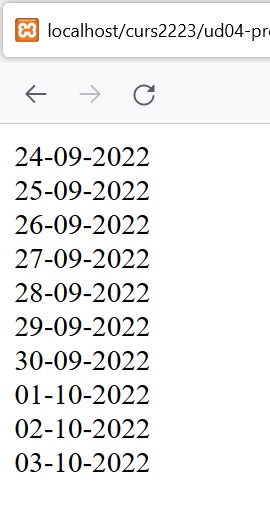
The for loop can iterate through strings of dates. Let’s see an example:
$today = date("d-m-Y");
for ($day = strtotime($today), $counter =1;
    $counter <= 10;
    $day = strtotime("+1day", $day), $counter++) {
        echo date("d-m-Y", $day)."<br>";
}
The code outputs the next 10 days from today.
1.2.4 Foreach
The foreach loop provides an easy way to iterate through an array or other list types. At each iteration, the current element in the array is assigned to the specified value (the iterator). The loops keeps executing until it reaches the end of the list.
$arrayName = array(10,7,4,8,9,21,14,3);
foreach($arrayName as $value) {
    echo $value."<br>"; // will show 10 in the 1st iteration, 7 in the 2nd, 4 in the 3rd and so on
}
The foreach loop can go through the key values as well.
$arrayName = array(10,7,4,8,9,21,14,3);
foreach($arrayName as $key => $value) {
   echo "Position: $key Value: $value <br>";
   // Position: 0 Value 10, Position: 1 Value 7, and so on
}
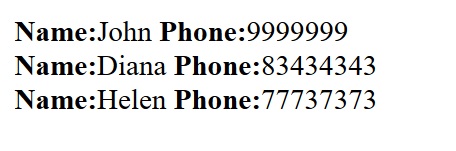
This is especially interesting with associative arrays, where keys can be any other thing than correlative numbers.
$phones=array("John"=>"9999999","Diana"=>"83434343","Helen"=>"77737373");
foreach($phones as $name=>$phone) {
    echo "<strong>Name:</strong>$name <strong>Phone:</strong>$phone<br/>";
}
The output:
1.2.5 Break, continue
Although is not very recommended, we can use the break and continue clauses to change the normal looping flow.
The break clause forces the end of the loop. The continue clause forces the jump to the next iteration without executing the rest of the loop
for(counter=initial_value;condition;increment) {
    // instructions;
    if(condition) { break; } // ends the loop
    // instructions;
    if(condition) { continue; } // goes to the next iteration
    // instructions;
}
Break and continue work in do…while and while loops too.
1.3 Control structures shorthands
Sometimes we need to show a lot of HTML contents inside a control structure. For that purpose PHP has some shorthands to facilitate the writing of code.
1.3.1 if-else shorthand
The if-else shorthand is:
if (condition):
# HTML code
elseif (condition):
# HTML code
else:
# HTML code
endif;
Let’s see an example:
<?php
$a = 6;
if ($a < 0): ?>
    <p> a is negative </p>
<?php elseif ($a == 0): ?>
    <p> a is equal to zero </p>
<?php else: ?>
    <p> a is positive </p>
<?php endif; ?>
We also have a shorthand for the ternary operator:
<?= $a ? 'a is true' : 'a is false'; ?>1.3.2 Loop shorthands
In PHP, the shorthand for a for loop is:
for (condition):
# code block
endfor;
For instance:
<br>
<?php for ($i=0; $i < 10; $i++): ?>
    <p> <?= $i; ?> </p>
<?php endfor; ?>
And for the while loop:
while (condition):
# code block
endwhile;
As we can see in the next example:
<?php
$j = 2;
while ($j <= 10): ?>
    <p> <?= $j++; ?> </p>
<?php endwhile; ?>
PHP also has shorthands for the foreach loop:
foreach ($array as $value):
# code block
endforeach;

foreach ($array as $key => $value):
# code block
endforeach;
Let’s see an example for simple arrays:
<ul>
<?php
$fruits = ['lemon', 'orange', 'tomato'];
foreach ($fruits as $fruit):
?>
    <li> <?= $fruit; ?> </li>
<?php endforeach; ?>
</ul>
And for associative arrays:
<ul>
<?php
$persons = [55 => "Martha", 68 => "Michael"];
foreach ($persons as $key=>$value) :
?>
    <li><strong><?= $key; ?>: </strong><?= $value; ?></li>
<?php endforeach; ?>
</ul>
1.4 Exit, die and return statements
The exit statement ends the script’s execution at any moment that it’s reached.
exit can take an argument, an integer or a
string. If the argument is a
string, this function prints its content just
before exiting.
If it is an int, that value will be used as
the exit status and not printed. Exit statuses should be in
the range 0 to 254. The status 0 is used to terminate the
program successfully. Other status different from 0 should
be considered error status.
Exit codes are used for command line programming. They have no significance when writing PHP to be invoked by a web server.
die is equivalent to
exit.
Examples:
exit(0); //terminates the program
exit(); // the same as above
exit; // the same as above
die; // the same as above
exit("Error"); // prints "Error" and terminates the program
exit(1); //terminates the program with the status code 1
The return statement ends the function returning (or not) a value. If the return statement is reached in the main program, it ends the execution as well.
2 Functions in PHP
You are surely familiar with the concept of function. A function is a reusable piece of code that is only executed when it’s called.
As in other computer languages, functions in PHP can receive parameters, and can return a result. In this unit we will go over functions in general, but particularly we will consider how to work with functions in PHP.
2.1 Creating a function
Functions are defined with the keyword
function and then the name, the parameters (if
there are any) and the sentences inside curly brackets.
function myFunc() {
    echo "Hello world";
}
Once defined, the function can be called (invoked) from anywhere on the page where it has been declared (by now) by typing its name followed by a set of parenthesis.
myFunc(); // will display "Hello world"2.2 Parameters
The parentheses that follow the function name are used to pass arguments to the function. In the function definition we declare a comma-separated list of variables. The parameters can then be used in the function when it’s called.
function myFunc($x, $y)  {
    echo "$x $y";
}
Once the parameters have been specified, the function can be called with the same number of arguments.
myFunc('Hello', 'world'); // will display "Hello world"2.2.1 Default parameters
It is possible to specify default values for parameters by assigning them a value inside the parameter list while declaring the function.
function myFunc($x, $y = 'Earth') {
    echo "$x $y";
}
myFunc('Hello','world'); // displays "Hello world"
myFunc('Hello'); // displays "Hello Earth"
The parameters without default values should be place at the beginning of the parameters list to avoid errors.
function myFunc($y='Earth',$x) {
    echo "$x $y";
}
myFunc('world','Hello'); // we'll get Hello world
myFunc('Hello'); // we'll get an error: 'Too few arguments'
2.2.2 Variable parameters list
A function cannot be called with fewer parameters than
specified in its declaration, but it can be called with more
parameters. This allows for the passing of a variable number
of arguments, which can then be accessed using a couple of
built-in functions:
func_get_arg(),
func_get_args() and
func_num_args().
The function func_num_args() returns the
actual amount of parameters passed to the function.
The function func_get_arg($position) returns
the parameter passed in the $position
position.
The function func_get_args() returns an
array containing all the parameters that the function
receives.
function myArgs() {
    $x = func_get_arg(0);
    $y = func_get_arg(1);
    $z = func_get_arg(2);
    echo "$x $y $z";
}
myArgs('One','Two','Three'); // displays "One Two Three"
If we are not sure of how many parameters the function will receive, we can iterate the parameters list and work with them.
Example: a function that receives a variable list of parameters and returns their sum.
function fsum() {
    if(func_num_args()==0) { // no parameters
        return false;
    } else {
        $totalsum=0;
        // we iterate through the parameters list
        for($i = 0; $i < func_num_args(); $i++ ) {
            $totalsum = $totalsum + func_get_arg($i);
        }
        return $totalsum;
    }
}
In newer versions of PHP we can use the
... token to access variable
arguments as an array.
function add(...$numbers) {
    $result = 0;
    foreach ($numbers as $n) {
        $result += $n;
    }
    return $result;
}
We can use the ... token to
unpack arrays passed as arguments.
function add($a, $b) {
    return $a + $b;
}

$array=[5,6];
echo add(...$array); // returns 11
2.2.3 Named Arguments
PHP 8.0.0 introduced named arguments as an extension of the existing positional parameters. Named arguments allow passing arguments to a function based on the parameter name.
Named arguments are passed by prefixing the value with the parameter name followed by a colon:
Example:
<?php
function showName($name, $surname) {
    echo "Hello " . $name . " " . $surname;
}

showName(surname: "Smith", name: "John"); // can change the order
// prints "Hello John Smith"
2.2.4 The return statement
Return is a jump statement that causes the function to end its execution and return to the location where it was called from.
function myFunc() {
    return; // exit from the function
    echo 'Hi'; // this statement never executes
}
We can optionally use the return sentence to
return a value to the place where the function had been
called from.
function myFunc() {
    return 'Hello';
}
echo myFunc(); // will display "Hello"
A function without a return value automatically returns
null.
2.2.5 Some examples
- A function that receives two strings as arguments, and then shows the result of their concatenation:
function showConcat($cad1, $cad2) {
    echo "$cad1 $cad2";
}

// calling the function
showConcat("Hello","world"); // will display Hello world- A function that receives two strings as arguments, and then returns the result of their concatenation:
function getConcat($cad1, $cad2) {
    $cad3 = $cad1." ".$cad2;
    return $cad3;
}

echo getConcat("Hello","world"); // will display Hello world
2.3 Scope and life of variables
By default, any variable created inside a function is limited to this local scope. Once the scope of the function ends, the local variable is destroyed.
// variable defined outside the function
$x = "Global";

function test() {
    // we try to display the value of $x
    echo "The value of x is $x";
    // we define a new variable $y
    $y="Local";
}
// let's call the function
test();
// let's try to access the local variable
echo "The value of y is $y";
If we run the script above, we’ll get:
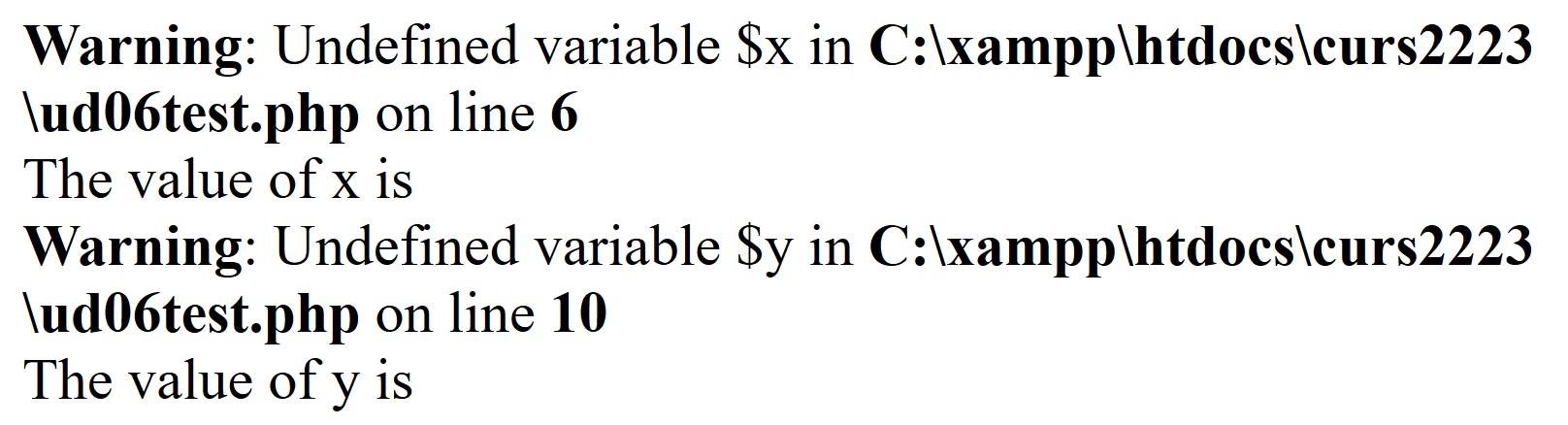
Variables defined outside a user-defined function are not
available within the function. Similarly, variables defined
within a function exist just inside that function. That’s
why we get a warning when we try to echo the value of
$y outside our test()
function.
Global variables can be accessed and modified inside the
function if they are declared locally as
global.
$x = 'Hello'; // global $x
function myFunc() {
    global $x; // use global $x: it's not a new variable
    $x .= ' World'; // we can change the value of the global $x
}
myFunc();
echo $x; // show global $x: "Hello World"
An alternative way to access variables from the global
scope is by using the predefined
$GLOBALS array. In this case
the variable is referenced by its name, specified as a
string without the dollar sign.
function myFunc() {
    $GLOBALS['x'] .= ' World'; // change the value of global $x
}
It’s a good practice to avoid using globals whenever possible.
2.4 Passing parameters by value or by reference
As in other languages, parameters can be passed to a function in two ways: by value of by reference.
2.4.1 Passing parameters by value
In PHP, parameters are usually passed by value. That means that a copy of the variable passed as parameter, not the original variable, is used in the function. Thus, if we change the value of the parameter inside the function the change is only valid inside the function, and will be lost once the function ends.
Let’s see an example:
$x = 'Hello'; // global $x
function myFunc($x) {
    $x .= ' World'; // we change the value of the local copy of $x
    echo 'Inside the function the value of $x is '.$x."<br>";
}

echo 'Before the function the value of $x is '.$x."<br>";
myFunc($x);
echo 'Outside the function the value of $x is '.$x."<br>";
// show global $x: "Hello"
If we run the script, we’ll get:

2.4.2 Passing parameters by reference
When a function argument is passed by reference, changes
to the argument also change the variable that was passed in.
To turn a function argument into a reference, we can use the
& operator before the name of the
parameter.
function addString(&$cad1, $cad2) { // the & means by reference
    $cad1 = $cad1.$cad2;
}

$cad1='hello ';
$cad2=' world';
echo 'The value of $cad1 before the function: '.$cad1."<br>";
addString($cad1,$cad2);
echo 'The value of $cad1 after the function: '.$cad1."<br>";
//hello world: The change remains
When we run the script, we’ll get:

2.5 Type in functions
To allow functions to be more robust, PHP in its version 5 began to introduce argument type declarations, permitting the type of a function parameter to be specified. In the next script we’ll get an error message because the value of the parameter passed to the function doesn’t match the declared type.
function myPrint(array $a) {
    foreach ($a as $v) { echo $v; }
}
myPrint( array(1,2,3) ); // "123"
myPrint('Test'); // error!!! (because the parameter is not an array)
Support for return type declarations was added in PHP 7 as a way to prevent unintended return values.
function f(): array {
    // the function must return an array
}
To specify strict types we need to set
declare(strict_types=1);. This must be on the
very first line of the PHP file.
<?php
declare(strict_types=1);
In this example, inside the function is made a cast of
the variable $j from string to
int:
<?php
function sum(int $i, int $j){
    return $i + $j;
}

echo sum(5, "6"); //Outputs 11
The same function, with strict types, throws a fatal error:
<?php
declare(strict_types=1);

function sum(int $i, int $j){
    return $i + $j;
}

echo sum(5, "6"); //Fatal error: Uncaught TypeError: sum(): Argument #2 ($j) must be of type int, string given
2.5.1 Nullable types
Since PHP 7.1 type declarations for parameters and return
values can now be marked as nullable by
prefixing the type name with a question mark
(?). This signifies that as
well as the specified type,
null can be passed as an
argument, or returned as a value, respectively.
The function:
function test(?int $var): ?stringcan accept as parameter an integer or null
and can return a string or null.
2.5.2 Union types
A union type declaration accepts values of multiple different simple types, rather than a single one. Union types are specified using the syntax type1|type2|….
Union types are available as of PHP 8.0.0.
class Example {
    private int|float $var;
    public function squareAndAdd(float|int $bar): int|float
    {
        return $bar ** 2 + $var;
    }
}
In this example the property $var, the
parameter $bar and the return value of the
function squareAndAdd can be integer or
float.
2.6 Variable functions
We can have the name of a function in a variable. The function can be executed by calling it with the name of the variable.
Let’s see an example. Compare this code:
function add($x,$y) {
    return $x + $y;
}

function sub($x,$y) {
    return $x - $y;
}

$operation="sum";
$a=10;
$b=7;

if($operation=="sum") {
    echo add($a,$b);
}
else {
    echo sub($a,$b);
}
with this one:
function add($x,$y) {
    return $x + $y;
}

function sub($x,$y) {
    return $x - $y;
}

$operation="add";
$a=10;
$b=7;

echo $operation($a,$b); // we run the function which name
                        // matches the value of $operation
2.7 Recursive functions
As in other languages, we can define recursive functions. A recursive function calls itself until a certain condition is reached.
// the factorial of a number n is n*(n-1)*(n-2)...*1
// for example, the factorial of 4 is 4*3*2*1 = 24
function factorial($n) {
    $result=$n;
    if($n==1) {
        return $result; // we have reached the end, return the result
    }
    else {
        return $result*factorial($n-1); // next multiplication
    }
}
echo factorial(4); // 24
2.8 Anonymous functions
Anonymous functions, also known as closures, allow the creation of functions which have no specified name. They can be used as callable parameters (callbacks) for other functions, to assign a function to a variable, and for other many uses.
An example of an anonymous function assigned to a variable:
$hello = function($name) {
    printf("Hello $name");
};

$hello('Mary');
$hello('John');
2.8.1 Callbacks with anonymous functions
One of the most common uses of anonymous functions is as callbacks. Callback functions are called by the main function to do a task based on logic you supply:
<?php

$numbers = [12, 18, 5, 11, 10, 95, 3];

$multiple_five = array_filter($numbers, function($n) {
    return $n%5 == 0;
});

print_r($multiple_five);
/* OUTPUT:
Array
(
    [2] => 5
    [4] => 10
    [5] => 95
)
*/
In the code above, we simply return multiples of five
from a given array of numbers. The second parameter to
array_filter() is our callback function. It
performs the trivial task of checking if a number is
divisible by five. Without anonymous functions, we would
have to define this function somewhere else with the risk of
having an exiting name.
You can use the special use
keyword that allows you to access variables from the parent
scope inside an anonymous function:
$hello = "Hello World!";

$cut = function(int $numChars) use ($hello){
    $hello = substr($hello, 0, $numChars);
    return $hello;
};

echo $cut(4) . "<br>"; //Outputs Hell
echo $hello; //Outputs Hello World!
In this sample the function $cut is
accessing the global variable $hello with
use, but unlike accessing with
global, the global variable is not modified
inside the function.
2.8.2 Arrow functions
Arrow functions are basically a shorter way of writing simple anonymous functions. They were introduced in PHP 7.4.
- The keyword
functionis replaced withfn. - The
returnkeyword is omitted. The function only can contain one expression and that expression is the return value of the arrow function. - Global variables are implicitly available inside arrow
functions without using the
usekeyword.
We can rewrite the previous $cut function as
an arrow function:
$cut = fn(int $numChars) => substr($hello, 0, $numChars);As anonymous functions use can be very complex and varied, it’s recommended to check the PHP manual entries related with them:
3 Include and require statements
Usually, a function can only be invoked from the same script when has been declared. Nevertheless, we can use a function in any script by using the include / require statements.
3.1 Include
This statement takes all the text in the specified file and includes it in the script, just as if the code had been copied to that location.
We can use include to have
a library of functions and include them in our pages.
The include statement works
with functions, but not only with functions. Any piece of
code can be added to a script using this clause. We can use
include to include headers,
footers or other sections that are repeated from one
document to another.
A functions.php document:
function add($x,$y) {
    return $x + $y;
}
function sub($x,$y) {
    return $x - $y;
}
and now, in our previous script:
include "functions.php";
$operation="add";
$a=10;
$b=7;
echo $operation($a,$b);
This way we can use the functions in any script without
copying and pasting them, only including them by using the
include clause.
3.2 Require
The require statement
includes and evaluates the specified file the same way that
include does. There is one
exception: when a file import fails,
require halts the script with an
error, whereas
include only displays a
warning. So, with require is
obligatory for the required file to exist.
In any case, if we use
include | require the invoked
file should exist in order to avoid warnings or errors when
the functions are called and they’re not found.
3.3 Include_once
The include_once statement
behaves like include, except
that if the specified file has already been included, it is
not included again.
include_once 'myfile.php'; // include the file only once3.4 Require_once
The require_once statement
works like require, but it
does not import a file if it has already been imported.
3.5 Include or require?
Usually, we can think of using
include when the file to be
inserted is not decisive regarding the operation of our
program. We will use require
when the file is necessary for the correct operation of our
program.
Finally, the variants with
_once should be used when our
program has considerable dimensions and it may be the case
that the inclusion of the file occurs several times.
3.6 The
__DIR__ magic constant
PHP 5.3 introduced a new magic constant called
__DIR__. When you reference the
__DIR__ inside a file, it returns the directory
of the file. The __DIR__ doesn’t include a
trailing slash e.g., / or \ except
it’s a root directory.
It is recommended to use this constant on includes and
requires because PHP scripts run relative to the current
path, not to the path of their own file. Using
__DIR__ forces the include to happen relative
to their own path.
For example, in the next files structure:
- file1.php
- dir/
   - file2.php
   - file3.php
If file2.php includes file3.php
like this:
include `file3.php`;It will work fine if you call file2.php
directly. However, if file1.php includes
file2.php, the current directory will be wrong
for file2.php, so file3.php cannot be included.
It will work fine if the include code is:
include __DIR__ . `/file3.php`;Note how we add the slash to the start of the file name.
Therefore, it’s a good practice to use the
__DIR__ constant when you include a file.